Linux First Impressions
Table of Contents
One of my New Year's resolutions for 2025 was to switch to Linux. It's now July and I'm finally doing it. Better late than never I guess.
I'm sure I don't have to explain why I'm doing this, blah blah Microsoft bad blah blah AI bad blah blah. Anyway, I like learning about technology (even though I'm not that smart and find a lot of it very intimidating), so I thought it'd be worth trying out. If not for daily use, then at least a cool learning experience.
My Setup
I decided to use Linux Mint. Basically every source I found listed it as a good "beginner distro" and it has a nice default UI that's analogous to windows (by contrast, Ubuntu, another "beginner distro", looks like a bootleg iPad). Many experienced users also label it as a "just works distro", so it shouldn't require too much tinkering. Sounds like a great fit!
I ended up testing it on a virtual machine. I originally wanted to dual boot it instead, since that’s what I’ve seen a lot of guides suggest, but it would have been a lot more complicated since I'm using a laptop. Typically, when people dual boot, they're using desktop PCs and each OS has it's own designated drive. My laptop has a single hard drive and it's soldered on. I know you can make partitions on a single drive, but I've also heard about that causing issues for some people. I've also also heard about Windows updates fucking with the bootloader and bricking your computer. So, maybe dual booting just isn't worth all the hassle, VirtualBox will do for now.
Emulating it still wasn't a perfect experience though. Since my computer isn't super beefy, it had trouble running two operating systems at once. I adjusted the settings to give VirtualBox more memory, which helped a little, but was still very laggy. I'm fully aware that this isn't an issue with Linux, but it did effect my experience with it so I thought it was worth mentioning.
In fairness, I used the version that came with the Cinnamon desktop environment, which is slightly more resource-intensive compared to some of the other environments they offer. I've seen users of other distros talk about just downloading/installing new desktop environments without having to completely reinstall their OS, so maybe I'll have to see if that's available on Mint.
Getting Started
Setting it up was very easy. It has a GUI that walks you through everything.
The very first issue I encountered was getting the screen resolution to work. Apparently, my computer's display is 3000 x 2000, but the maximum size available in the settings is 2048 x 1152. The only scaling options for the UI elements were 100% and 200%, so they were always either way too big or way too small. I'm not sure if this is a true fix, since it still doesn't detect my true screen resolution, but I was able to enable fractional scaling and set it to 150%, which looks a lot better.
Customization
Once I got that figured out, customization was a breeze! I tested out a few different pre-made themes, but I ended up settling on Cinnamox-Kashmir-Blue.
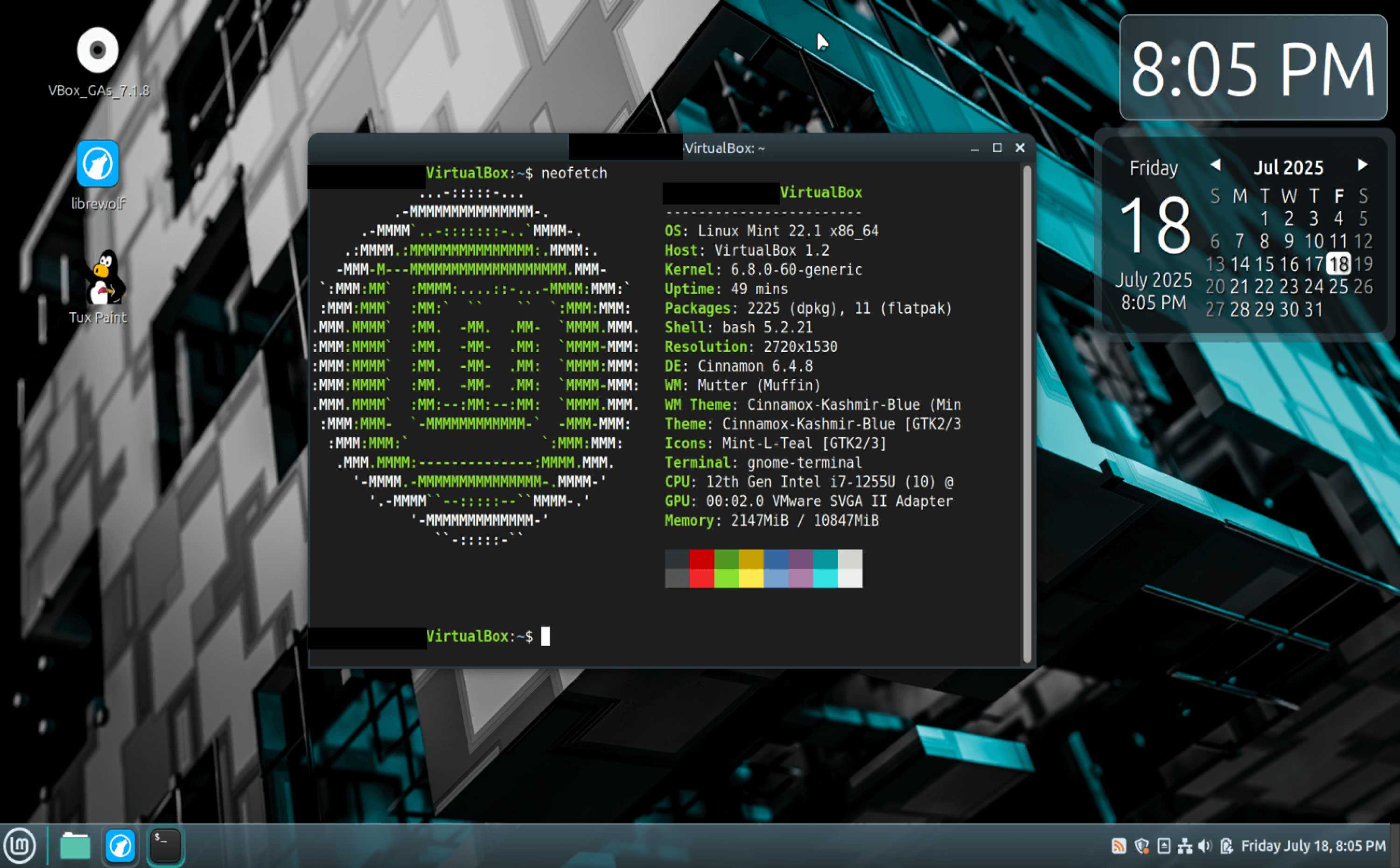
My Linux Mint desktop. The system information is displayed via neofetch in the terminal window. The background is an abstract 3D rendering of a metallic gray and cyan cube. The UI elements all have muted gray/blue/cyan gradient backgrounds overlayed with white text. The taskbar and desktop widgets are slightly transparent.
It was so funny. I was so excited about getting everything set up that I went to go tell my siblings about it. When I finally showed them my desktop layout, they both laughed in my face and told me it "looked like shit".
Fuck you guys, I think it's cool 🖕
Managing Programs
Basic Programs
There are two ways to manage software on Mint, using the terminal and using the software manager, which is basically an app store. For the sake of learning, I opted to use the terminal whenever possible.
Installing programs is pretty easy, but I found deleting to be a bit more challenging. Since most Linux distros encourage the use of FOSS, I thought it'd be fun to try out some other software that I don't use on windows. I installed LibreWolf and attempted to uninstall Firefox, which comes prepackaged with Mint. The browser itself disappeared, but when I used apt list --installed it showed a bunch of extra files that came with Firefox (mostly language packs).
So, I did a little research and it turns out I have to use purge to delete both the program and any associated files. I try to purge Firefox , it says that I can't because Firefox doesn't exist. So, I redownload Firefox and then try again. It's deleted, but when I check the list again all the extra stuff is still there. My best guess is that maybe those files are related to LibreWolf, since LibreWolf is a fork of Firefox. Maybe the developers just didn't bother changing the names of files that they thought nobody would actually see.
As a brief aside: For some reason, my desktop theme overrides Firefox's browser theme, but not LibreWolf's. Both of their right-click menus are effected by my desktop theme though, and I can't seem to turn that off. I wonder why that is?
That aside, all the prepackaged apps seem to work fine. I think Mint strikes a nice balance with the kind and amount of programs it comes with. One of my siblings showed me his fresh installation of Kali Linux and it came with so many fun, but ultimately superfluous, programs. Meanwhile, I know some other distros come with basically nothing and leave you to download everything yourself.
Gaming
I was able to install Steam and access my account. Steam technically works as intended, but it made my system so laggy that every game was completely unplayable. I tried to boot up Balatro and it took over a full minute to get from the start menu to the actual game. Like I said, I don't think this is because of Mint, it's because it's running in a virtual machine and maxing out it's memory. However, Balatro is a very light game as it is, so I can't imagine my computer being able to handle anything bigger.
There is also an issue with games not automatically launching when I selected the game's icon on desktop or the start menu. I have to open steam separately and select the game manually. This is annoying but not the worst thing in the world, and I assume it's probably not too hard to fix.
Aside from Steam, I also downloaded Tux Typing and Tux, of Math Command. I'm not sure if modern kids who're used to Roblox or Minecraft would still enjoy them, but I thought they were cute! They made me very nostalgic. Reminded me of when I was a kid and the teacher would take us to the computer lab to play edutainment games like these.
Art
I really enjoyed using Tux Paint! In the past, I've tried to use Kid Pix on Windows, but it kept crashing, so this is a nice alternative. The lag made the lines a little jagged, but it still works. It also worked when I used my finger on the touchscreen.
My only major gripe is that you have to download a completely different program for the options menu (which I couldn't even get working). I don't understand why it's not just a tab in the base program. It's also not mentioned anymore in the program itself, so a lot of users probably don't even know it exists.
In the future, I'd like to test out some "proper" art programs, like Krita, and do some tests with my pen, which has pressure sensitivity.
Accessibility
I really only use one accessibility feature regularly and it's text-to-speech. Unfortunately, Mints text-to-speech is pretty awful.
While browsing, I wanted to read a blog post that looked interesting, so I entered reader mode and let the TTS read it out to me. Everything up to this point had been mildly annoying at worst, so I was shocked when the voice reading the post sounded like Microsoft Sam and horribly mispronounced some words. Upon doing further research, this seems to be a recurring issue with most popular Linux distros. I looked into how to download custom voices and for the life of me I couldn't figure it out.
In Summary
I don't think I'm quite ready to switch to Linux full time. There's some minor bugs I have to work out and more stuff I need to test. Still, I feel like I learned a lot and I'm glad I did it! I have more plans for messing around with it in the future.